“Inside the Brainstorming Skill” - Part 5 of 7. Some questions are clearer shown than told. The skill can open a browser tab and ask its Socratic questions as clickable mockups - but only when earned, only one screen per turn, offered just-in-time and decided per question. Source-grounded in the skill’s own files; every claim is cited
file:line.
Throughout this series we have treated the Socratic interview as a text exchange. But some questions resist text. “Which of these two layouts feels right?” is a question whose answer lives in the eye, not in a sentence. For exactly those questions, the brainstorming skill can move the dialogue into a browser. This is the visual companion, and it is the last gear of the machine.
The crucial framing, stated up front in the skill:
“A browser-based companion for showing mockups, diagrams, and visual options during brainstorming. Available as a tool - not a mode.”
SKILL.md:142–144
A tool, not a mode. Accepting the companion does not turn the whole session visual. It simply makes the browser available for the questions that earn it. Every question still gets the same per-question judgment.
Part one: the just-in-time offer
The skill is emphatic about when to offer the companion: not at the start, but at the first moment a question genuinely needs it.
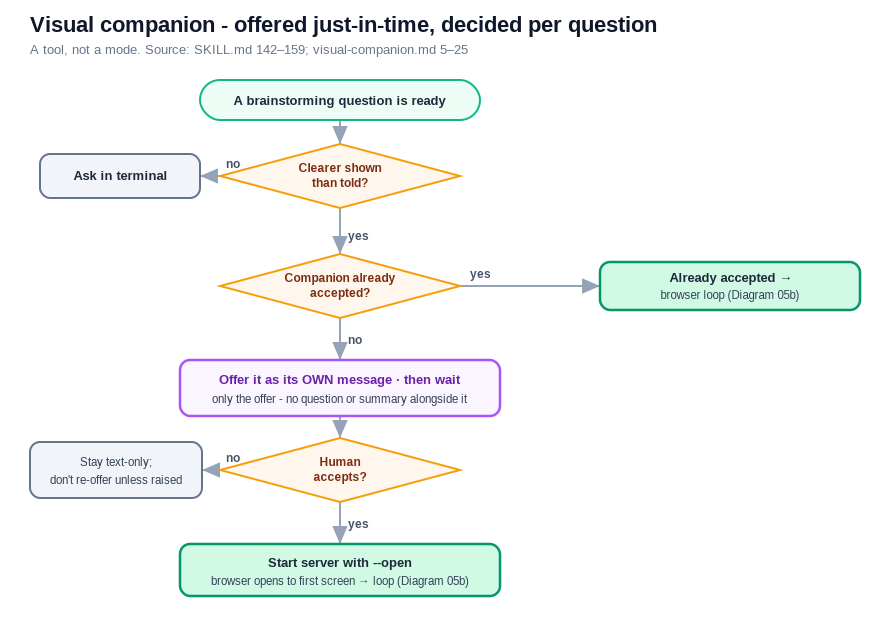
“Do NOT offer it upfront. Wait until a question would genuinely be clearer shown than told - a real mockup / layout / diagram question, not merely a UI topic. The first time that happens, offer it then, as its own message.”
SKILL.md:146
And the offer has a strict form:
“This offer MUST be its own message. Only the offer - no clarifying question, summary, or other content. Wait for the user’s response. If they accept, start the server with
--openso their browser opens to the first screen automatically. If they decline, continue text-only and don’t offer again unless they raise it.”
SKILL.md:149
The decision diagram captures the full tree:
- A question is not clearer shown than told → ask in the terminal. (Most questions.)
- A question is clearer shown than told, and the companion is already accepted → go straight to the browser loop.
- It is, but the companion hasn’t been offered yet → make the offer, as its own message,
and wait. Decline → stay text-only and don’t nag. Accept → start the server with
--openand enter the loop.
There is a real piece of behavioral discipline encoded here. The offer is gated on a concrete visual question, it is isolated in its own message so it can’t be missed or rushed, and a decline is sticky - the skill won’t keep asking. The companion is opt-in, once, at the right moment.
Part two: per-question routing
Accepting the companion does not mean every question becomes a mockup. The skill repeats the test for each question:
“Even after the user accepts, decide FOR EACH QUESTION whether to use the browser or the terminal. The test: would the user understand this better by seeing it than reading it?”
SKILL.md:151
The companion guide draws the line precisely (visual-companion.md:9–25):
- Browser when the content is visual - wireframes, layouts, architecture diagrams, side-by-side comparisons, design polish, spatial relationships.
- Terminal when the content is text - requirements, conceptual A/B/C choices, trade-off lists, technical decisions, clarifying questions.
And the trap it explicitly warns against:
“A question about a UI topic is not automatically a visual question. ‘What does personality mean in this context?’ is a conceptual question - use the terminal. ‘Which wizard layout works better?’ is a visual question - use the browser.”
SKILL.md:156
This is the same Socratic engine from Part 2 - the loop is unchanged. Only the medium of an individual question shifts. The companion is a channel, not a different conversation.
Part three: the screen loop
When a question does go to the browser, it runs through a tight per-turn loop. The mechanics
come from the companion guide’s “The Loop” section (visual-companion.md:105–137).
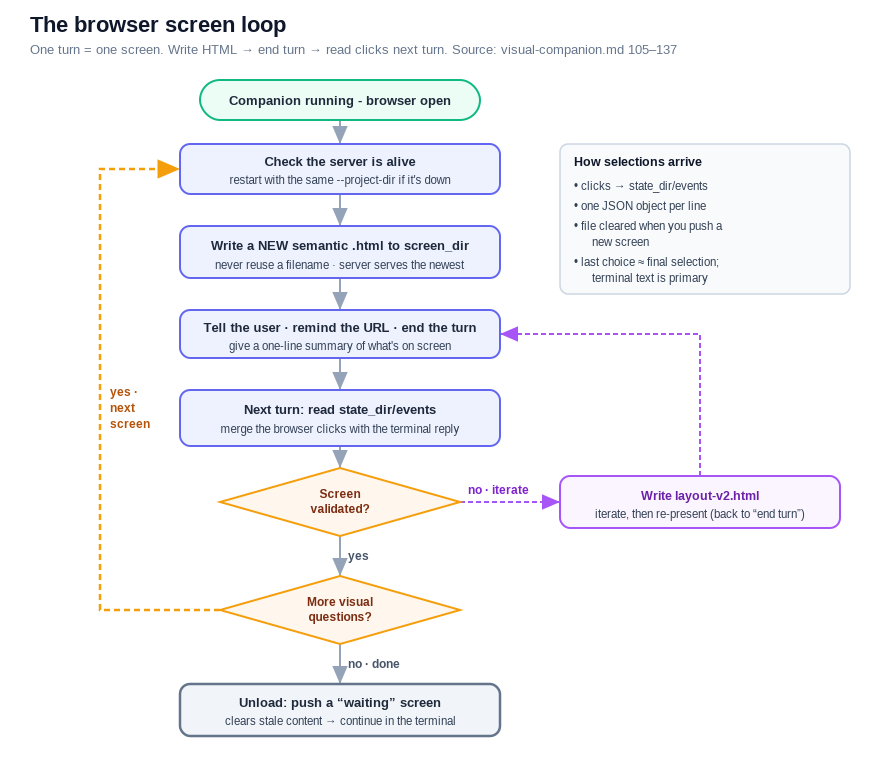
How it actually works, per the guide:
“The server watches a directory for HTML files and serves the newest one to the browser. You write HTML content to
screen_dir, the user sees it in their browser and can click to select options. Selections are recorded tostate_dir/eventsthat you read on your next turn.”
visual-companion.md:29
So a single turn is: write one screen → end the turn → read the clicks next turn. Walking the loop:
- Check the server is alive - and if it has shut down, restart it with the same
--project-dir, which reuses the port so the user’s open tab reconnects on its own (visual-companion.md:108). - Write a new semantic HTML file to
screen_dir-layout.html,visual-style.html- and never reuse a filename; the server serves the newest file (visual-companion.md:109–112). - Tell the user what to expect and end the turn - remind them of the URL every step, give
a one-line summary of what’s on screen, and ask them to respond in the terminal
(
visual-companion.md:114–117). - On the next turn, read
state_dir/events- the clicks arrive as one JSON object per line - and merge that with the user’s terminal text, which is the primary feedback (visual-companion.md:119–122). - Iterate or advance. If the feedback changes the current screen, write a new version
(
layout-v2.html) and re-present. Only move on once the current screen is validated (visual-companion.md:124). - Unload when returning to the terminal. When the next step doesn’t need the browser, push
a “waiting” screen to clear the stale content so the user isn’t staring at a resolved choice
while the conversation has moved on (
visual-companion.md:126–135).
How a selection comes back
The click stream is structured and ephemeral:
“When the user clicks options in the browser, their interactions are recorded to
$STATE_DIR/events(one JSON object per line). The file is cleared automatically when you push a new screen.”
visual-companion.md:258–259
The guide adds a nuance worth keeping: the last choice is usually the final selection, but the
full click stream can reveal hesitation worth asking about (visual-companion.md:267). And if
the events file doesn’t exist at all, the user simply didn’t touch the browser - fall back to
their terminal text (visual-companion.md:269). The terminal message is always primary; the
clicks are structured supporting data.
Why this fits the Socratic method
It would have been easy to make “visual mode” a heavyweight thing you switch on and live in. The skill pointedly does the opposite, and the reasons rhyme with everything in this series:
- Offered just-in-time, not upfront - the same patience as one-question-at-a-time. Don’t front-load; introduce a tool exactly when the moment calls for it.
- Decided per question - the same incrementalism as section-by-section approval. Each question is judged on its own.
- One screen per turn, then end the turn - the same yield-the-floor discipline as the text loop. The agent shows one thing and waits.
- A decline is sticky - the same respect for the human’s stated preference that runs through the whole skill.
The visual companion isn’t a different skill bolted on. It is the same Socratic interview, given a second channel for the questions that live in the eye instead of the ear.
Where the series lands
Five posts in, the shape of the whole thing is clear. The brainstorming skill is a discipline for not building yet - a hard gate, a patient one-question-at-a-time interview aimed at purpose, constraints, and success criteria, a design ratified section by section, a spec written and gated by a human, and an optional browser for the questions text can’t carry. Its method is Socratic in the truest sense: it does not hand you a design. It asks you questions until the design is already yours.
The first six posts cover the skill as behavior. Part 6 is an appendix for the curious: it opens the hood of the visual companion and looks at the machinery underneath.
Sources
skills/brainstorming/SKILL.md- lines 142–159 (the visual companion section: tool-not-mode, just-in-time offer, offer-as-its-own-message, per-question decision, the UI-topic trap)skills/brainstorming/visual-companion.md- lines 5–25 (when to use: browser vs terminal), 27–31 (how it works), 105–137 (“The Loop”), 258–269 (events format and interpretation)
← Previous: Part 4 - The Spec Pipeline · Next: Part 6 - Under the Hood (appendix) →
The series - Inside the Brainstorming Skill: 0 · The Map · 1 · Dialogue, Not Interrogation · 2 · The Interview Engine · 3 · From Answers to Design · 4 · The Spec Pipeline · 5 · The Visual Companion (you are here) · 6 · Under the Hood